 By
By 
The “Antivirus-only” era is officially dead. In 2026, protecting your digital life requires more than just a software icon in your taskbar. As cyber-attacks evolve from simple PC viruses to complex network-wide incursions—targeting everything from your smart fridge to your privacy-first smartphone—a new guardian is needed. Enter Unified Threat Management (UTM): the centralized “brain” that transforms your home network into an impenetrable fortress. By integrating a Next-Gen Firewall, AI-driven malware detection, and real-time intrusion prevention, UTM suites provide the Digital Armor necessary to survive a landscape where generative AI malware is the new norm. At OnlineShieldHub, we’ve tested the top contenders to see which Unified Threat Management solutions truly deliver on the promise of total network-wide security.
The Core Components of a 2026 Unified Threat Management Suite
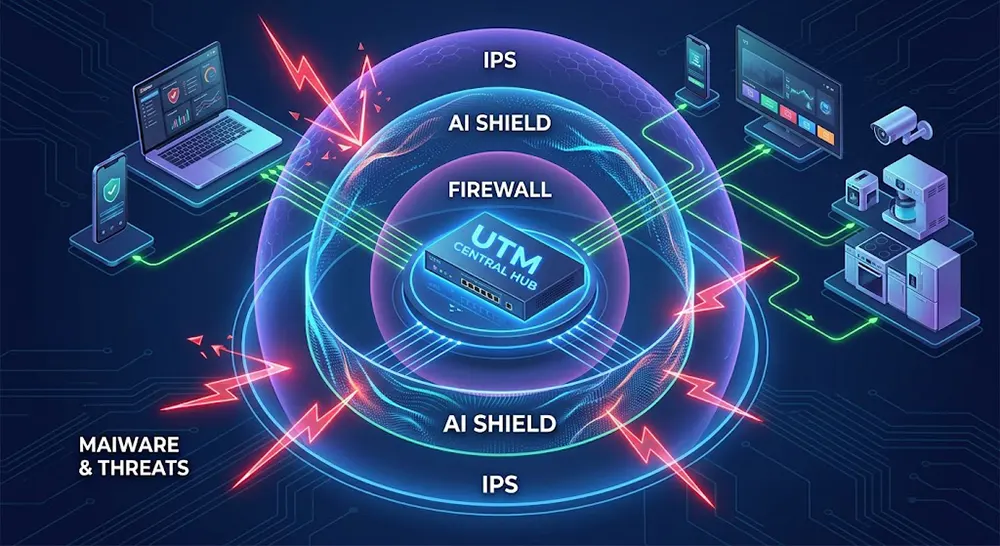
To understand why a Unified Threat Management system is superior to traditional security, we must look under the hood. In 2026, a “true” UTM suite isn’t just a router with a few extra features; it is a sophisticated security appliance that combines multiple defensive layers into a single, cohesive engine. This approach is central to a modern cyber resilience strategy, ensuring that if one layer fails, others are ready to intercept the threat.
1. Next-Gen Firewall (NGFW) with AI Malware Shield
The heart of any Unified Threat Management suite is its Next-Gen Firewall. Unlike older models that only looked at “ports” and “addresses,” a 2026 NGFW uses Deep Packet Inspection (DPI) to understand exactly what an application is doing. When paired with an AI Malware Shield, the system can identify malicious patterns in real-time, blocking zero-day exploits before they even reach your devices. This is particularly effective against modern threats like the Shai-Hulud worm which bypasses traditional signature-based detection.
2. Intrusion Prevention System (IPS) and Network-wide Security
An IPS acts as your network’s active sentry. It continuously monitors traffic for known attack signatures and anomalous behavior. For households with numerous shadow IoT security risks, the IPS is vital. It can detect and block an exploit targeting a vulnerable smart camera or thermostat that hasn’t received a security update in years, providing true Network-wide Security without needing to install software on every single gadget.
3. EDR for Home: Endpoint Detection and Response
One of the most significant shifts in 2026 is the migration of EDR for Home into the UTM ecosystem. This component allows the UTM to act as a central command center. If your laptop becomes infected via a rogue USB drive, the UTM can “sense” the unusual activity and automatically isolate that specific device from the rest of the network. This prevents lateral movement—a favorite tactic of modern ransomware—ensuring your backup servers and smart home controllers remain untouched.
Top Unified Threat Management (UTM) Suites for 2026: The Digital Armor Reviews
The 2026 security market offers a clear divide between “set-it-and-forget-it” consumer gear and high-performance prosumer hardware. Choosing the right Unified Threat Management suite requires balancing throughput with ease of use. Below are the top-tier solutions OnlineShieldHub has rigorously benchmarked for the modern digital fortress.
1. FortiGate 40F / 60F Series: The Enterprise Powerhouse
For users demanding zero compromise, the FortiGate series by Fortinet remains the undisputed champion. These devices utilize dedicated security processors (ASICs) to handle SSL Inspection at lightning speeds. Unlike standard routers, this Unified Threat Management appliance analyzes encrypted traffic without causing a bottleneck in your fiber connection.
- Best for: Power users and home offices requiring enterprise-grade threat intelligence.
- Expert Tip: Pair this with a high-performance VPN protocol to maintain security while accessing your home lab remotely.
2. Firewalla Gold Plus: The Plug-and-Play King
Firewalla has mastered the art of making complex Network-wide Security accessible to everyone. Managed entirely via a slick mobile app, the Gold Plus offers a seamless AI firewall setup that identifies every device on your network instantly. It is the perfect choice for families who want to block sophisticated incursions without learning complex command-line scripts.
3. Sophos Firewall Home Edition: The Best Software UTM
Sophos provides an incredibly generous offer: their full-scale XGS enterprise software is free for home use. By installing this on a dedicated mini-PC or a post-quantum HSM home server, you gain access to an AI Malware Shield that rivals corporate defenses. It is particularly effective at sandboxing suspicious files before they reach your desktop.
4. Ubiquiti UniFi Dream Machine (UDM) Pro: The Ecosystem Giant
The UDM Pro is the “Apple” of the networking world. It integrates a Unified Threat Management gateway with a high-capacity storage system for security cameras. While its security features are slightly less granular than Fortinet’s, its “all-in-one” dashboard makes managing your Wi-Fi, cameras, and IoT devices incredibly intuitive.
5. pfSense & opnSense: The Open Source Beasts
For privacy purists, these FreeBSD-based platforms are the gold standard. They allow for 100% control over your hardware and data. We recommend integrating them with decentralized VPN mesh tools to create a truly private network bridge that bypasses ISP snooping and state-level DPI.
Network-wide Security: Protecting the Unprotectable
The fatal flaw of traditional antivirus is its inability to run on “dumb” smart devices. Your smart fridge, nursery camera, and Wi-Fi lightbulbs are often the weakest links. A Unified Threat Management system provides Network-wide Security by acting as a universal filter for these unshielded endpoints.
Securing Shadow IoT
“Shadow IoT” refers to devices that connect to your network without your explicit security oversight. In 2026, these are primary targets for agentic AI malware. By using a UTM’s Intrusion Prevention System (IPS), you can “virtually patch” these devices, blocking known exploits at the gateway before they ever reach the vulnerable hardware. This is a critical component of a modern cyber resilience strategy.
SSL Inspection and Content Filtering
Since over 90% of web traffic is encrypted, hackers hide malicious payloads inside HTTPS streams. A modern Unified Threat Management suite performs “Deep Packet Inspection” (DPI), unmasking these hidden threats. Furthermore, network-level content filtering ensures that phishing domains are blocked for every device in the house, regardless of whether they have security software installed. This creates a safer environment for AI-powered home devices that lack built-in browsers or security interfaces.

Implementation: Setting Up Your Unified Defense
Transitioning to a Unified Threat Management architecture requires a strategic setup to ensure maximum speed without sacrificing security. Whether you are a beginner or a pro, how you integrate the device into your current topology is the difference between a “laggy” network and a seamless one.
Bridge Mode vs. Gateway Mode
If you prefer to keep your current Wi-Fi router, you should set your UTM to “Bridge Mode.” This allows the device to act as a silent, transparent filter. However, for maximum Network-wide Security, we recommend “Gateway Mode.” In this configuration, the UTM replaces your router entirely, giving it full control over AI password rotation tools and DHCP management. This setup is the most effective way to avoid “Double NAT” issues that can disrupt gaming or VoIP services.
Configuring AI Shields and Reducing False Positives
Modern UTMs use generative AI malware detection to spot threats that haven’t been discovered yet. When you first launch your Unified Threat Management suite, set the AI sensitivity to “Monitor Only” for the first 48 hours. This allows the system to learn your habits. Once you’ve whitelisted legitimate traffic—like your work VPN or game updates—you can switch to “Active Blocking” for an impenetrable defense.
Monitoring & Real-time Alerts
In 2026, a “set-and-forget” mentality is risky. Ensure your UTM is linked to your privacy-first smartphone. Receiving a push notification the moment an intrusion is thwarted provides that “absolute peace of mind” every digital citizen deserves. For more advanced setups, consider a private LLM local AI to analyze your UTM logs locally without sending data to the cloud.
Your Home, Your Fortress
As we look toward the future of the web, the distinction between a “home network” and a “corporate network” has officially vanished. The threats are identical, and the stakes—your financial data, your privacy, and your family’s safety—are higher than ever. Unified Threat Management is no longer a luxury reserved for the Fortune 500; it is a fundamental requirement for the modern smart home.
The Verdict: While a high-quality antivirus remains a valuable last line of defense, a Unified Threat Management suite is your primary shield. It is the digital armor that allows you to explore the metaverse and decentralized web with confidence. Stop protecting your devices individually and start defending your network as a whole.
FAQ: Unified Threat Management (UTM) & Security Suites
Does a UTM slow down my internet speed?
It can, as Deep Packet Inspection (DPI) is resource-heavy. However, 2026 hardware like the Firewalla Gold Plus or FortiGate 60F is engineered to handle gigabit speeds even with all security layers active. Always check the “Threat Protection Throughput” spec before buying.
Do I still need an antivirus if I have a UTM?
Yes. This is the “Defense in Depth” principle. While the UTM stops threats at the gateway, an AI-driven antivirus is necessary to stop threats that enter via USB drives or local file sharing.
Are UTM subscriptions worth the annual fee?
Absolutely. The fee funds the real-time updates for your AI Malware Shield and IPS signatures. Without these updates, your device cannot protect against the latest quantum malware threats.
Can I build a UTM using an old PC?
Yes. Using open-source software like opnSense (External Link) on a multi-NIC mini-PC is a great way to build a high-performance Unified Threat Management system on a budget.
Continue Reading
Top 5 AI-Driven Antivirus for MacOS: Beyond Signature-Based Detection
In 2026, traditional signature-based antivirus is obsolete for Mac users. Sophisticated threats like polymorphic malware and "Living-off-the-Land" attacks...
Read Insight →Top Quantum-Threat Antivirus Software 2026: Defending Against Future Crypto Attacks
In the rapidly evolving landscape of cybersecurity, quantum computing represents both a groundbreaking advancement and a profound threat....
Read Insight →Best Post-Quantum Password Managers 2026: Quantum-Resistant Encryption Tested
As a cybersecurity expert with over a decade of experience in network security, encryption protocols, and threat analysis,...
Read Insight →