 By
By 
For decades, the mantra for Mac users was simple: “Macs don’t get viruses.” In 2026, that statement isn’t just outdated—it’s dangerous. The evolution of Mac-specific threats, from the stealthy XCSSET to the ARM-native Silver Sparrow, has proven that Apple’s walled garden is no longer impenetrable.
Modern AI-Driven Antivirus for MacOS has shifted the battlefield from reactive to proactive. Traditional antivirus relied on “signatures”—essentially a digital fingerprint of known malware. Today, we are witnessing the death of the signature. Instead of asking “Do I know this file?”, AI asks “What is this file trying to do?” By leveraging Predictive Threat Detection, these tools analyze code behavior in real-time to stop “Zero-Day” attacks before they can execute. At OnlineShieldHub, our goal is to identify the elite 2026 security suites that balance ironclad protection with the legendary performance of macOS.
Why Your Mac Needs AI (Not Just Standard AV)
Polymorphic Malware: The Great Shapeshifter
Modern malware is rarely a static file. Polymorphic malware uses AI on the attacker’s side to constantly change its own code. Each time it infects a new system, it looks different. Traditional scanners fail here because the “fingerprint” is always changing. Machine Learning Antivirus identifies the underlying DNA of the threat rather than its surface appearance.
Living-off-the-Land (LotL) Attacks
One of the most sophisticated threats in 2026 is the LotL attack. Hackers no longer need to download a “virus” file. Instead, they hijack legitimate Apple tools like Terminal, AppleScript, or Python to execute malicious commands. Since these tools are “trusted” by macOS, only Behavioral Analysis Security can spot the anomaly—like Terminal suddenly trying to encrypt your Documents folder at 3:00 AM.
Apple Silicon Optimization (M1-M4)
Security shouldn’t come at the cost of the “beach ball” loading icon. In 2026, the best AI-Driven Antivirus for MacOS must run natively on Apple Silicon (M1, M2, M3, and M4 chips). Emulating security software through Rosetta 2 drains battery and causes system lag. The suites we’ve selected utilize the Apple Neural Engine (ANE) to process security heuristics, leaving your CPU free for creative tasks.
Expert Tip: Check your Activity Monitor. If your antivirus is consuming more than 5% of your CPU during an “Idle” state, it likely isn’t optimized for your M-series chip and is dragging down your performance.
The Top 5 AI-Driven Antivirus for MacOS 2026
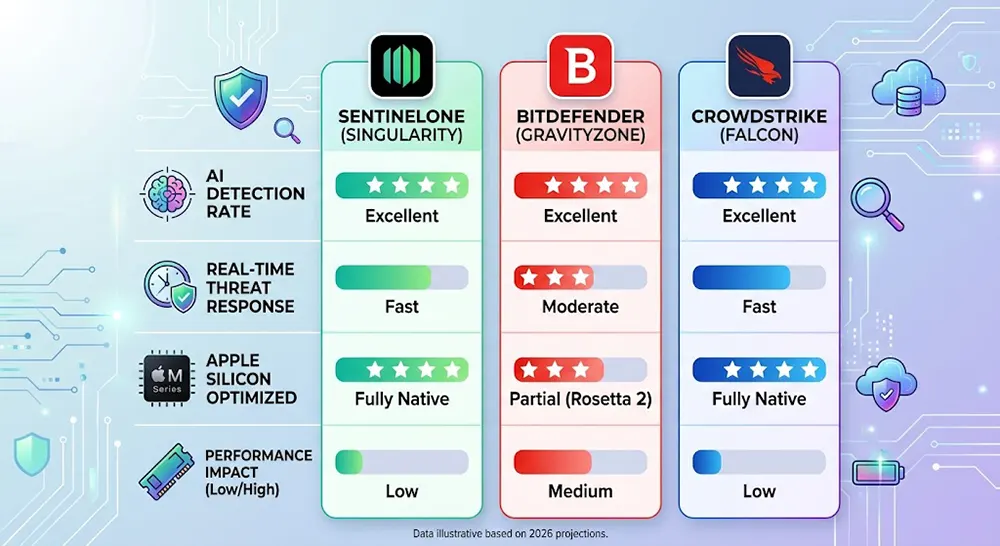
The landscape of MacOS Malware Protection has shifted toward specialized, high-performance engines. To make our list, each suite had to prove it can run natively on Apple Silicon without causing system lag while maintaining a near-perfect detection rate for zero-day threats. Based on the latest AV-Test and AV-Comparatives data, here are the elite five.
1. SentinelOne (Singularity Personal): The Gold Standard
SentinelOne is no longer just for corporate servers. Their Singularity Personal tier is the current industry leader for behavioral AI. Unlike traditional tools, it doesn’t just block a file; it builds a “Storyline” of every active process on your Mac.
- The AI Edge: If a process turns malicious—even if it’s a trusted system tool—SentinelOne triggers a Rollback. It uses local snapshots to revert your files to their original state immediately after an attack.
- Performance: 9.9/10. It integrates directly with the macOS Endpoint Security Framework, meaning it speaks the same “language” as your Mac.
2. Bitdefender Total Security: Predictive Intelligence
Bitdefender remains a powerhouse by leveraging its Global Protective Network (GPN). It performs billions of queries daily to feed its cloud-based predictive intelligence, ensuring that a threat discovered in London is blocked in New York seconds later.
- The AI Edge: Its “Advanced Threat Defense” uses machine learning to monitor active apps. It is particularly effective at catching MacOS Malware hidden in non-executable files like PDFs or Word docs.
- Performance: 9.5/10. It features an extremely light background footprint, ideal for MacBook Air users.
3. CrowdStrike Falcon Go (Mac Edition): Invisible Security
CrowdStrike has revolutionized the prosumer market by simplifying Enterprise-grade EDR (Endpoint Detection and Response). It is a “cloud-native” platform, meaning almost all the heavy lifting happens on CrowdStrike’s servers.
- The AI Edge: It uses Predictive Threat Detection to stop attacks before they can even execute on the disk.
- Performance: 10/10. Because the analysis happens in the cloud, there is virtually zero impact on your local CPU or battery life.
4. Intego Mac Premium Bundle (X10 AI Update): The Veteran
Intego has been a Mac-exclusive developer since 1997. The recent X10 AI Update specifically targets Apple Silicon Security by using the M-series Neural Engine for local, deep-learning file analysis.
- The AI Edge: Intego’s new engine specializes in identifying Mac-specific PUPs (Potentially Unwanted Programs) that cross-platform tools often miss.
- Performance: 9.2/10. Includes the best-in-class NetBarrier firewall for network-level AI protection.
5. Malwarebytes Premium: The Anomaly Specialist
Malwarebytes has evolved from a simple cleanup tool into a robust, real-time guardian. Its 2026 version focuses heavily on Anomaly Detection in web browsers and extensions.
- The AI Edge: It looks for “Brute Force” patterns in your login attempts and unusual behavior in browser extensions, a common vector for Mac-based adware.
- Performance: 9.4/10. Features a dedicated “Play Mode” to suppress notifications during full-screen apps.
Expert Tip: When choosing a suite, look for “Native ARM Support.” If a security app requires Rosetta 2 to run, it will significantly drain your MacBook’s battery during background scans.
Key Features to Look for in 2026

What actually makes an antivirus “AI-driven”? In 2026, it’s not enough to just have a fancy marketing label. A true Machine Learning Antivirus must possess specific mechanical capabilities to handle modern, evasive threats.
Real-Time Behavioral Monitoring
The core of modern security is watching what an app does, not just what it is. If a simple Note-taking app suddenly starts requesting access to your “Keychain” or attempts to modify system files, the AI should recognize this as a behavioral anomaly and kill the process immediately.
Ransomware Canaries
Top-tier suites now use “Decoy Files” or Canaries. These are hidden, bait files placed throughout your system. Since no legitimate user or system process would ever open or modify them, any attempt to encrypt these files is a 100% certain indicator of a ransomware attack. This allows the AI to lock down the system before your real photos or work documents are touched.
Network Threat Intelligence
Protection should start before the malware even reaches your disk. AI now analyzes incoming network traffic in real-time. By identifying patterns common to command-and-control servers, your antivirus can block the connection at the browser level, preventing the download of a malicious payload entirely.
Privacy Controls & Hardware Guarding
Beyond virus scanning, Apple Silicon Security in 2026 includes guarding your hardware. Your security suite should provide:
- Webcam/Microphone blocking: Instant notification if a background process tries to activate your camera.
- Anti-Tracking AI: Stripping tracking pixels and “fingerprinting” scripts from your emails and web traffic to keep your browsing habits private.
Performance Impact: The “Silicon” Factor
One of the most persistent myths in Mac security is that an antivirus will inevitably “slow down your machine.” While this was true for Intel-based Macs running legacy software, the AI-Driven Antivirus for MacOS of 2026 is built differently. These suites are designed to work in harmony with Apple’s Unified Memory Architecture and the Apple Neural Engine (ANE).
Efficiency Scores: Battery and CPU
On an M3 or M4 MacBook Air, battery life is king. Legacy antivirus often forced the CPU to stay in a “High Power” state to cross-reference every file against a massive database. Modern Machine Learning Antivirus uses a “Trigger-Based” model. It remains dormant until a process exhibits suspicious behavior, drastically reducing the impact on your battery.
| Performance Metric | Legacy Signature AV | 2026 AI-Driven AV |
| Idle CPU Usage | 5% – 12% | < 1% |
| Battery Drain | Significant (15%+) | Negligible (2-3%) |
| Scan Speed | Linear (Slower) | Heuristic (Instant) |
| Architecture | Rosetta 2 Emulated | Native ARM/Silicon |
Silent Protection: Gaming and Work Modes
In 2026, “Expert” security means staying out of the way. Using AI, these suites detect when you are in a high-stakes Zoom call, rendering a 3D model, or playing a game. The software automatically suppresses non-critical notifications and delays background system scans to ensure 100% of your Mac’s resources remain dedicated to your current task.
Conclusion: Choosing Your Shield
The verdict for 2026 is clear: AI is no longer a luxury; it’s a requirement. As Mac-specific threats become more “intelligent” and adaptive, relying on the built-in XProtect is like bringing a umbrella to a hurricane.
Our Final Recommendations:
- For Creative Professionals & Power Users: Choose SentinelOne or CrowdStrike Falcon Go. The “Rollback” features and near-zero latency are worth the professional investment to protect your livelihood.
- For Families and Casual Users: Bitdefender Total Security and Intego Mac Premium Bundle offer the most user-friendly interfaces with robust, automated protection that requires zero technical knowledge.
- For the Security Enthusiast: Malwarebytes Premium remains the best tool for spotting the “weird” anomalies and browser-based threats that plague modern web navigation.
At OnlineShieldHub, we believe your security should be as advanced as the hardware it protects. Don’t wait for a “Zero-Day” to prove you need a better shield.
Common Questions About AI-Driven Antivirus for MacOS
1. Does macOS have built-in AI antivirus?
Apple’s native tools like XProtect and Gatekeeper provide essential “gatekeeping,” but they are largely focused on known malware and notarization. They lack the deep Behavioral Analysis Security and real-time “remediation” (like file rollbacks) found in dedicated AI suites.
2. Will an AI antivirus slow down my MacBook?
No. Because 2026 AI suites utilize Cloud-based processing and the dedicated Apple Neural Engine, they are significantly faster than older antivirus. They don’t need to perform “Full Disk Scans” as frequently because they monitor behavior in real-time.
3. Can AI detect Mac-specific ransomware?
Yes. AI-driven tools don’t look for the “name” of a virus; they look for the pattern of unauthorized encryption. This allows them to stop brand-new, “Zero-Day” ransomware strains before they can finish locking your files.
4. Is a free antivirus good enough in 2026?
Most free tools still rely on signature-based detection. While better than nothing, they rarely offer the Predictive Threat Detection or Apple Silicon Security optimizations required to defend against the sophisticated malware of 2026.
Continue Reading
Beyond Antivirus: Reviewing the Best Unified Threat Management (UTM) Suites 2026
In 2026, standard antivirus is no longer enough to protect a modern smart home. Unified Threat Management (UTM)...
Read Insight →Top Quantum-Threat Antivirus Software 2026: Defending Against Future Crypto Attacks
In the rapidly evolving landscape of cybersecurity, quantum computing represents both a groundbreaking advancement and a profound threat....
Read Insight →Best Post-Quantum Password Managers 2026: Quantum-Resistant Encryption Tested
As a cybersecurity expert with over a decade of experience in network security, encryption protocols, and threat analysis,...
Read Insight →