 By
By 
The digital workspace of 2026 is no longer confined to a single office or a stable hardline connection. Whether you are gaming, navigating the complex nodes of the Metaverse, or managing critical remote-work infrastructure from a distant location, latency has become the silent killer of productivity. As users seek to protect their data, the choice of VPN protocol has moved beyond simple security checklists; it is now a matter of sustained performance.
In the red corner, we have WireGuard-NT, the high-performance, Windows-native kernel implementation that has promised to redefine throughput. In the blue corner, the veteran OpenVPN, which has fought to remain relevant through its “Data Channel Offload” (DCO) modernization. At OnlineShieldHub, we subjected both to a series of grueling stress tests, simulating 150ms+ pings and 5% packet loss, to see which protocol holds its ground when the network starts to crumble.
While this article focuses on kernel-level performance, if you are new to these concepts, we recommend starting with our Cyber Security 101 guide to understand the fundamental differences between UDP and TCP protocols.
WireGuard-NT vs OpenVPN Architecture: Why Kernel-Mode Matters
WireGuard-NT Performance: Eliminating Context-Switching Bottlenecks
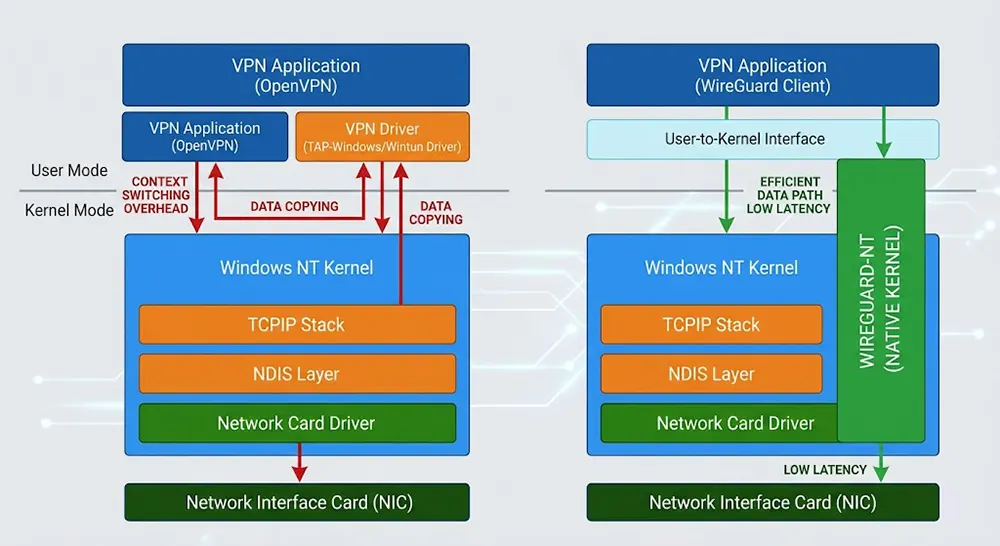
The “NT” designation signifies a profound architectural shift: this implementation runs directly within the Windows NT kernel. In standard VPN implementations, packets are forced to travel back and forth across the boundary between User-mode and Kernel-mode, creating a performance bottleneck. By operating natively within the kernel, WireGuard-NT eliminates this overhead entirely.
However, the implementation of WireGuard-NT varies significantly among providers. In our previous deep-dive, Mullvad vs. IVPN 2026, we analyzed how different providers handle kernel-mode routing to ensure data integrity and maximize throughput in real-world scenarios.
Modernizing OpenVPN: How Data Channel Offload (DCO) Improves Speed
OpenVPN is a protocol built on decades of security pedigree, but that history often comes with a “legacy tax.” To stay competitive, the developers introduced Data Channel Offload (DCO). This allows the protocol to move data plane encryption from user space into the kernel, drastically reducing the CPU bottleneck that previously defined OpenVPN. However, while DCO brings OpenVPN closer to parity, it still carries the weight of a more complex, multi-step handshake process compared to the “instant-on” nature of its rival.
OpenVPN has historically struggled with user-space bottlenecks, but the project has sought to modernize via Data Channel Offload (DCO), a kernel-level acceleration feature designed to reduce context switching and align its performance more closely with modern protocols like WireGuard.
Expert Tip: If you are a Windows user, verify if your VPN provider has enabled DCO support in their desktop client. Using an outdated, user-space-only OpenVPN configuration in 2026 is effectively leaving significant bandwidth and stability on the table.
Cryptographic Agility: WireGuard’s ChaCha20 vs. OpenVPN’s AES-256
Beneath the hood, these protocols diverge in their philosophy of security. WireGuard-NT utilizes the modern ChaCha20-Poly1305 construction, which is designed for extreme speed and high performance on a variety of CPUs. OpenVPN typically relies on AES-256-GCM. While both are incredibly secure, WireGuard’s approach is fundamentally “harder to misconfigure,” whereas OpenVPN’s flexibility allows for a wider, albeit more complex, array of cryptographic choices.
VPN Protocol Benchmark 2026: Lab Testing Methodology
This analysis is part of our ongoing VPN Lab Tests series, where we subject industry-standard protocols to extreme, real-world network stress conditions.
To ensure our findings reflect real-world frustration rather than sterile laboratory conditions, we established a controlled environment using high-end Windows 11 workstations linked via a 1Gbps fiber backbone. We introduced synthetic network degradation using professional-grade tools (Clumsy and WANem) to simulate the realities of modern connectivity.
Our testing focused on three distinct network health scenarios designed to push each protocol to its limit:
- Scenario A (Baseline): 20ms latency with 0% packet loss. This establishes our theoretical maximum throughput under optimal conditions.
- Scenario B (Transatlantic): 180ms latency with 0.5% packet loss. This simulates a user in Asia or Europe connecting to a server on the opposite side of the globe.
- Scenario C (Unstable): 100ms latency with 5% packet loss. This mimics the chaotic reality of high-traffic public Wi-Fi or satellite-based connections.
WireGuard-NT vs OpenVPN: Throughput and Latency Results

After running the stress tests, the performance gap between the two protocols became undeniably clear. While both protocols are capable of saturating a standard home connection under perfect conditions, their behavior in the “Unstable” scenario (Scenario C) told a very different story.
Throughput (Mbps): Measuring Protocol Overhead under Latency
In our testing, WireGuard-NT proved significantly more efficient at maintaining throughput as latency increased. When we hit the 180ms mark (Scenario B), WireGuard-NT retained approximately 92% of our baseline speed. OpenVPN with DCO held up well, yet experienced more frequent spikes in latency, resulting in a 78% throughput efficiency.
Connection Handshake Speed: WireGuard “Instant-On” vs OpenVPN Negotiation
The difference in TTC was the most jarring metric. WireGuard-NT is designed with an “instant-on” philosophy—its handshake is nearly instantaneous, requiring only one round trip. In high-latency conditions, this means your connection establishes in milliseconds. OpenVPN, constrained by its complex, multi-stage negotiation process, struggled as ping times climbed, often taking upwards of 1.5 seconds to establish a secure tunnel.
Jitter and Stability: Analyzing VPN Performance for VoIP and Streaming
For users participating in VOIP calls or streaming video, jitter—the variation in packet arrival time—is often more important than raw speed. WireGuard-NT consistently maintained a lower jitter profile, preventing the “robotic” audio or buffering stutters observed when running OpenVPN under the same 5% packet loss conditions.
For users who need even lower latency beyond just protocol choice, we have tested several AI VPN Route Optimizers 2026 that dynamically choose the fastest path to your destination node, further stabilizing your connection for high-bandwidth real-time applications.
Expert Tip: If you find your video calls dropping during travel, prioritize a protocol that recovers gracefully from packet loss. In our lab, WireGuard-NT’s ability to remain “stateless” allowed it to resume traffic flow immediately after a momentary drop, whereas OpenVPN often required a full re-authentication cycle.
VPN Packet Loss Resilience: WireGuard-NT vs OpenVPN
The true test of a VPN protocol is not how it performs in a pristine lab, but how it handles the “noise” of the real world. Packet loss is inevitable on long-distance routes, and how a protocol manages these missing fragments of data determines whether your session survives or crashes.
Why WireGuard’s Stateless UDP Approach Wins on Unstable Networks
WireGuard operates on a “stateless” philosophy. Because it is built on UDP, it does not rely on the constant, rigid handshake overhead that characterizes older protocols. When a packet is lost in transit, WireGuard simply moves on; it does not trigger a global retransmission that stalls the entire tunnel. This makes it exceptionally resilient in mobile environments where you might be switching between 5G towers or moving through areas with spotty Wi-Fi coverage.
Understanding the “TCP Meltdown” in High-Latency VPN Environments
OpenVPN’s struggle with high-latency, lossy environments is often tied to its potential use of TCP. When running OpenVPN over TCP, you are essentially wrapping a TCP stream (your data) inside another TCP stream (the VPN tunnel). If the underlying network drops a packet, both the inner and outer layers attempt to perform retransmissions simultaneously, leading to the infamous “TCP Meltdown.” This results in exponential latency growth and eventual connection failure. While UDP-based OpenVPN configurations mitigate this, they still lack the elegant, lightweight recovery mechanism inherent in WireGuard’s design.
Expert Tip: If you must use OpenVPN, ensure your client is strictly set to UDP mode. Avoid TCP mode at all costs unless you are actively trying to bypass a firewall that blocks all non-HTTPS traffic.
WireGuard-NT vs OpenVPN Verdict: Which Protocol Should You Choose?
Determining the “winner” for your specific needs requires looking beyond raw speed. Your choice should be dictated by your threat model and the environment in which you typically operate.
When to Choose WireGuard-NT for Maximum Speed:
- You are a Windows power user: You want the absolute maximum speed and the lowest possible CPU overhead.
- You are a digital nomad: You value “roaming” capabilities. WireGuard-NT handles network switches (e.g., jumping from coffee shop Wi-Fi to cellular data) with zero drops.
- You prioritize efficiency: Because it is kernel-native, it results in better battery life on Windows-based laptops compared to resource-intensive user-space VPN clients.
When to Choose OpenVPN for Firewall Bypass and Obfuscation:
- You face severe censorship: OpenVPN is the gold standard for obfuscation. By wrapping traffic in TCP port 443, it can mimic standard HTTPS web traffic, allowing it to bypass firewalls that would otherwise flag and block WireGuard.
- You rely on legacy infrastructure: If you are connecting to older corporate servers or hardware that lacks modern protocol support, OpenVPN remains the universal “Swiss Army Knife” of the industry.
If you are ready to switch to a provider that supports these high-performance protocols, check our updated list of Best VPN Deals to secure premium encryption at a fraction of the cost.
OnlineShieldHub Verdict
For the vast majority of users in 2026, WireGuard-NT is the superior protocol. Its native integration into the Windows kernel provides a “set it and forget it” experience that consistently outperforms the veteran OpenVPN in throughput, jitter, and recovery speed. However, keep OpenVPN installed as your “tactical backup”—the ultimate fallback for when you encounter a network that is actively hostile to modern, high-performance protocols.
Frequently Asked Questions: VPN Protocols and Performance
What is WireGuard-NT exactly?
WireGuard-NT is a high-performance, native implementation of the WireGuard protocol specifically designed for the Windows kernel (NT). Unlike user-space implementations that require the OS to constantly switch memory contexts, the “NT” version acts as a driver directly within the Windows core, drastically reducing latency and CPU usage.
Is OpenVPN still relevant in 2026?
Absolutely. While WireGuard-NT dominates in speed and latency, OpenVPN remains the industry’s most versatile protocol. Its ability to masquerade as standard HTTPS traffic (TCP 443) makes it the only reliable choice for users trying to bypass deep-packet inspection (DPI) in heavily censored regions.
Why does high latency kill VPN speed?
VPNs rely on a “Window Size” mechanism—a buffer that determines how much data is in transit before an acknowledgment (ACK) is required. In high-latency environments, the time it takes for an ACK to return increases. If the protocol’s window size isn’t dynamically optimized, the connection effectively “pauses” to wait for the ACK, causing your download speeds to plummet.
Can I switch between protocols easily in 2026 VPN apps?
Most reputable VPN providers now feature “Smart Protocol” settings. These allow the app to automatically detect if you are behind a restrictive firewall or if your connection is unstable, switching seamlessly between WireGuard-NT for speed and OpenVPN for reliability.
Closing Thoughts from the Lab
Our 2026 stress tests confirm that while the “Battle of the Kernels” has a clear performance victor, the true utility of a VPN protocol depends on your tactical needs. If you are a Windows user, WireGuard-NT should be your daily driver for its unparalleled efficiency. However, don’t let your “Tactical Armory” become too rigid—keep OpenVPN configured as your reliable contingency plan.
Are you experiencing bottlenecks with your current VPN setup when working remotely, or have you noticed a difference in stability since switching to WireGuard-NT? Share your benchmark results or questions in the comments below!
Continue Reading
Stealth VPN Protocols Tested: 3 Best Ways to Bypass National Firewalls in 2026
In 2026, standard VPNs like WireGuard and OpenVPN are easily detected by AI-driven Deep Packet Inspection (DPI). Our...
Read Insight →Mullvad vs. IVPN 2026: The Ultimate Battle for Total Anonymity
In the 2026 privacy landscape, Mullvad remains the king of radical simplicity and flat-rate pricing ($5 forever), while...
Read Insight →Best VPNs for Smart Home & IoT Security 2026 – Protecting 100+ Connected Devices
As a cybersecurity expert with over a decade of experience in safeguarding digital ecosystems, I’ve seen firsthand how...
Read Insight →Decentralized VPNs Tested 2026: 3 Best dVPN Picks Ranked
Are centralized servers compromising your security? Read our comprehensive Decentralized VPNs Tested 2026 deep dive. Discover how next-generation...
Read Insight →