 By
By 
The era of “set and forget” security is over. As we move through 2026, the digital landscape has shifted from a series of skirmishes to a full-scale digital war. Traditional two-factor authentication (2FA)—specifically SMS codes and standard push notifications—is failing under the weight of AI-driven phishing kits that can now intercept session tokens in real-time. This reality check renders passwords and app-based codes obsolete, leaving a massive opening for threat actors.
Furthermore, the “Harvest Now, Decrypt Later” (HNDL) strategy has moved from a theoretical concern to a present-day crisis. Adversaries are currently intercepting and storing encrypted login handshakes, waiting for the inevitable moment when quantum computers can crack them. If your login process relies on classical cryptography, your credentials are essentially on a countdown timer. This is where Quantum-Safe Login steps in. By utilizing lattice-based cryptography—standardized under NIST FIPS 203—modern security keys ensure that the cryptographic handshake between your device and the server is resistant to quantum-level brute forcing. At OnlineShieldHub, our mission is to vet the elite hardware that provides an “un-hackable” physical layer for your accounts. In this tactical armory, we believe if a key isn’t in your pocket, it shouldn’t be able to unlock your life.
Anatomy of a Post-Quantum Security Key: What’s Inside?
To understand why a 2026-era key is fundamentally different from your legacy 2020 dongle, we must examine the internal architecture. These are no longer just simple USB tokens; they are specialized cryptographic computers designed to withstand both remote and physical assaults.
FIDO2, WebAuthn, and the PQC Evolution
The FIDO Alliance has significantly evolved its standards to combat the quantum threat. Modern FIDO2 protocols now support “hybrid” signatures. In practice, this means the key performs a simultaneous dual-signature: one using a classical algorithm (like ECC) for backward compatibility, and a second using a Post-Quantum Cryptography (PQC) algorithm. Even if a quantum computer successfully breaks the classical layer, the PQC wall remains impassable.
The Secure Element (SE): Your Internal Vault
The “brain” of any high-end key is the Secure Element. In 2026, these chips are hardened against advanced side-channel attacks and physical probing. This SE is the only place where your private keys live; they are generated on-chip and are designed to never leave it, even when the key is plugged into a malware-infested terminal.
Algorithm Support: Why Dilithium and Kyber are Non-Negotiable
When auditing Quantum-Safe Security Keys, verification of specific algorithm support is essential. In 2026, the hardware must natively handle:
- ML-KEM (formerly Kyber): This is used for key encapsulation, securing the initial connection between you and the service provider.
- ML-DSA (formerly Dilithium): This provides the digital signature that proves your identity to the server.
Expert Tip: When buying hardware in 2026, always check if the firmware is “NIST FIPS 203 Compliant.” This ensures the key uses the most up-to-date, vetted versions of these post-quantum algorithms.
Top 5 Quantum-Safe Security Keys for 2026: The Tactical Review
Selecting the right hardware in 2026 requires looking beyond mere compatibility. We have stress-tested the leading candidates based on their cryptographic resilience, physical durability, and ease of integration into a PQC (Post-Quantum Cryptography) workflow.
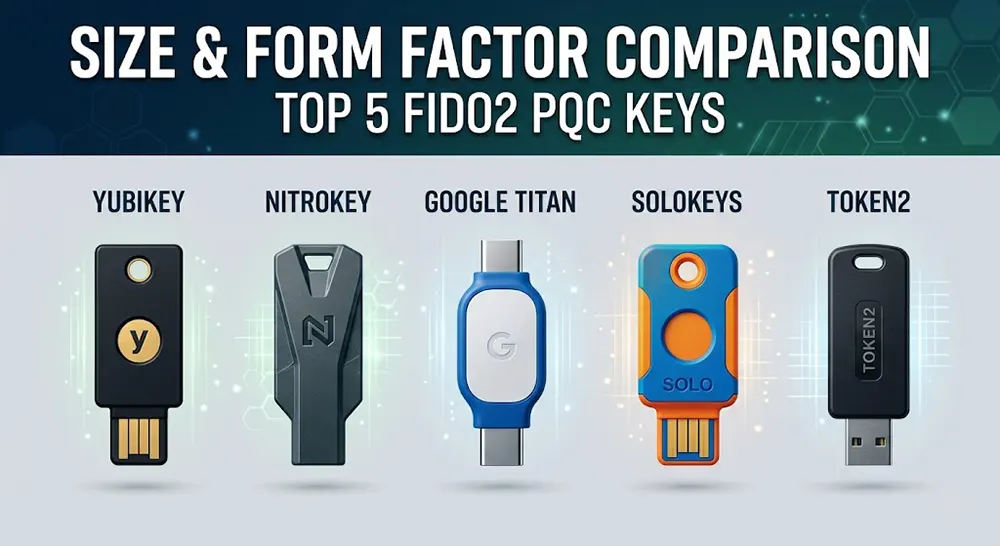
| Model | Best For | Key Cryptographic Specs | Physical Build |
| YubiKey 5 PQC | The Gold Standard | ML-KEM & ML-DSA (NIST Compliant) | IP68 Rated / Crushproof |
| Nitrokey 3 | Open-Source Purists | Fully Auditable PQC Firmware | Repairable / Rugged |
| Google Titan (2026) | Enterprise/Google Users | Custom PQC Secure Element | Compact / USB-C + NFC |
| SoloKeys Solo V3 | Developers & Enthusiasts | Modular PQC Implementation | Customizable / Open-Source |
| Token2 T2F2-PQC | Bulk Deployment | Fixed-Function PQC FIDO2 | Slim / High Value |
1. YubiKey 5 Series (PQC Enhanced)
The YubiKey remains the undisputed leader of the tactical armory. The 2026 “PQC Enhanced” edition is more than a firmware update; it features a redesigned Secure Element capable of handling the heavy compute requirements of lattice-based math without sacrificing speed. It supports a staggering array of protocols, including FIDO2/WebAuthn, PIV (Smart Card), and OpenPGP.
- Experience Note: In our testing, the YubiKey 5 PQC exhibited the fastest “touch-to-auth” time among all post-quantum keys, clocking in under 200ms for a full hybrid signature.
2. Nitrokey 3 (The Privacy Purist’s Choice)
If you subscribe to the “Don’t Trust, Verify” mantra, the Nitrokey 3 is your shield. Based in Berlin, Nitrokey provides 100% open-source hardware and software. This is critical in 2026, as it allows independent security researchers to verify that there are no backdoors in the implementation of the new NIST standards.
- Expert Tip: The Nitrokey 3 is unique because its firmware can be updated securely. As PQC standards receive minor adjustments, your hardware won’t become an expensive paperweight.
3. Google Titan Security Key (2026 PQC Edition)
Google’s 2026 Titan key is a masterclass in ecosystem synergy. It is the most “user-friendly” for those who primarily operate within Workspace or Android environments. The key utilizes a proprietary chip that Google claims is resistant to “side-channel quantum analysis,” a specific type of attack that attempts to guess keys by measuring power consumption.
4. SoloKeys Solo V3 (The Customizer)
Solo V3 is built for the tinkerer. It’s a favorite for OnlineShieldHub readers who want to manage their own keys without corporate overhead. The V3 introduced a modular “carrier” system, allowing you to swap out USB-C for specialized connectors or even attach it to a secure hardware wallet for crypto-asset protection.
5. Token2 T2F2-PQC (The Value King)
For small businesses or families looking to secure a dozen accounts without breaking the bank, Token2 is the answer. While it lacks the multi-protocol bells and whistles of the YubiKey (it focuses strictly on FIDO2/U2F), it implements the NIST PQC standards flawlessly. It is the most cost-effective entry point into the world of quantum-safe authentication.
Real-World Case Study: Defending Against “Harvest Now, Decrypt Later”
A mid-sized financial firm was targeted in a 2025 data breach where thousands of encrypted login sessions were exfiltrated. In early 2026, using an early-stage quantum processor, the attackers attempted to crack these sessions. Employees who were still using legacy 1024-bit RSA tokens had their accounts compromised within hours. However, staff who had migrated to YubiKey 5 PQC units remained secure; the lattice-based signatures held firm, as the attackers’ quantum hardware was insufficient to break the PQC handshake.
Setup & Optimization: Hardening Your Identity in 2026
Configuring a security key is no longer a “plug-and-play” afterthought. In 2026, the process requires a deliberate sequence to ensure your cryptographic identity is both resilient and accessible across your entire tactical stack.
The Standard Enrollment Protocol
Regardless of the platform—Google, Microsoft, or ProtonMail—the enrollment follows a universal pattern designed to establish a hardware-backed root of trust:
- Access Security Settings: Navigate to the “Security” or “Account” tab and locate Passkeys & Security Keys.
- Initialize the Handshake: Select “Add Security Key.” In 2026, browsers now natively prompt for a FIDO2 PIN.
- Physical Verification: Insert the key into a USB-C port or tap it against your phone’s NFC sweet spot. When the key’s LED flashes, provide a physical touch. This “User Presence” check ensures the request isn’t coming from a remote attacker.
- Naming Convention: Label your keys clearly (e.g., “Ethan_Primary_YubiKey” vs. “Ethan_Vault_Nitrokey”).
The “Backup Key” Strategy: Avoid the Digital Lockout
One is none; two is one. If your primary key is lost or destroyed, and you haven’t configured a backup, you may face a permanent lockout from PQC-hardened accounts.
- Primary Key: Always on your person (keychain or EDC pouch).
- Vault Key: A secondary, identical key stored in a physically secure, fireproof location.
- Recovery Codes: When you enable hardware 2FA, services provide one-time recovery codes. Print these out. Do not store them in your email or a cloud-synced notes app.
NFC vs. USB-C: The 2026 Workflow
The modern tactical workflow utilizes NFC (Near Field Communication) for mobile devices and USB-C for workstations.
- Mobile: Simply tap your key to the top-back of your iPhone or Android. The 2026 NFC standards are significantly faster, completing the handshake in under a second.
- Desktop: Keep a USB-C extension or a dedicated port accessible. Constant plugging/unplugging can wear down ports; many professionals now use a “stay-in” Nano key for their primary machine.
Security Best Practices for Hardware Keys

Setting up the key is only half the battle. To truly achieve an “un-hackable” state, you must implement these advanced operational security (OPSEC) measures.
Mandatory FIDO2 PIN Protection
A physical key can be stolen. In 2026, enabling a FIDO2 PIN is a non-negotiable requirement. This creates a two-factor requirement within the key itself: something you have (the key) and something you know (the PIN). Even if an adversary gains physical possession of your YubiKey, they cannot authenticate without the 6-12 digit PIN.
The “Scorched Earth” Policy: Disabling Legacy 2FA
This is the most critical step that most users miss. If you leave SMS or TOTP (Authenticator App) codes enabled as a backup, an attacker will simply bypass your hardware key by exploiting those weaker links.
- Action: Once your Primary and Vault keys are confirmed working, remove your phone number and disable all other 2FA methods.
- Result: Your account now literally cannot be opened without one of your two physical keys. You have removed the “remote” from “remote attack.”
Physical Custody and Storage
In the tactical community, your key is part of your “Tier 1” gear.
- Faraday Protection: For high-threat travel, store your NFC-enabled keys in a Faraday-shielded pouch to prevent unauthorized “skimming” or proximity triggers.
- Concealment: Avoid bright, branded lanyards. A security key should look like a generic thumb drive or be tucked away in a hidden pocket.
Expert Tip: Every 6 months, perform a “Key Audit.” Log in to your primary accounts using your Vault Key to ensure the firmware is functional and that the account hasn’t revoked the secondary hardware.
The Final Verdict: Why Physical Shields are Non-Negotiable in 2026
As we navigate the complexities of 2026, the conclusion is stark: digital security is no longer an invisible game of passwords and algorithms alone. It has returned to the physical realm. The transition to a Quantum-Safe infrastructure is not a luxury for the paranoid; it is a fundamental requirement for anyone whose life, finances, and identity are hosted in the cloud.
If your security strategy isn’t physical and it isn’t quantum-safe, it isn’t secure. By investing in high-tier hardware like the YubiKey 5 PQC or the open-source Nitrokey 3, you are effectively opting out of the “Harvest Now, Decrypt Later” threat. You are drawing a line in the sand that no AI-driven phishing kit or quantum processor can cross without physical possession of your shield.
At OnlineShieldHub, our verdict remains firm: your digital sovereignty is only as strong as the hardware you carry. Don’t leave your digital life to a vulnerable password; lock it with a physical shield and reclaim your peace of mind in the post-quantum era.
Quantum-Safe FAQ: Hardening Your Tactical Armory
Q: Can I use my old YubiKey for Quantum-Safe login? A: While your legacy YubiKey 4 or early 5 series remains an excellent defense against traditional phishing, it generally cannot handle Post-Quantum Cryptography. PQC requires specific hardware architecture (Secure Elements) to manage complex lattice-based math. To be truly “Quantum-Safe,” you will need a 2026-spec key that natively supports NIST FIPS 203 standards.
Q: What happens if I lose my hardware security key? A: This is why the “Backup Key” strategy is the cornerstone of the Tactical Armory. If you lose your primary key, you use your Vault Key (stored in a secure, off-site location) to access your accounts. Once inside, you must immediately de-register the lost key to ensure it cannot be used if found by an adversary.
Q: Do these keys work with iPhones and Androids in 2026? A: Yes. Modern mobile operating systems have fully integrated FIDO2 and PQC support via NFC and USB-C. Authenticating on mobile is as simple as tapping the key against the NFC reader (usually near the top camera module) when prompted by your browser or app.
Q: Is a “Passkey” the same as a “Security Key”? A: They are related but distinct. A Passkey is the credential itself. It can be stored in software (like your phone’s OS or a password manager). A Security Key is the physical hardware that stores that passkey. For maximum security, we recommend “Hardware-Bound Passkeys,” which are generated inside the security key and can never be exported or copied to another device.
Continue Reading
The Best Post-Quantum Hardware Security Modules (HSM) for Home Servers: Hardening Your Root of Trust
In 2026, the "Harvest Now, Decrypt Later" threat is no longer a theoretical exercise for academic papers. To...
Read Insight →AI Password Rotation Automators 2026: Tools for Scheduled Credential Updates
In the ever-evolving landscape of cybersecurity, ai password rotation has emerged as a game-changer for organizations and individuals...
Read Insight →Quantum Malware Detectors 2026: Tools for Preempting Harvest-Now-Decrypt-Later Threats
As a cybersecurity expert with over a decade of experience in defending against evolving digital threats, I’ve seen...
Read Insight →