 By
By 
The “Cloud” privacy paradox has reached a critical tipping point. Every time you interact with ChatGPT, Claude, or Gemini, you aren’t just getting an answer; you are effectively donating your intellectual property, personal queries, and sensitive data to a centralized corporate vault. For the “vọc vạch” community at OnlineShieldHub, this trade-off is increasingly unacceptable. The goal of this guide is to bridge the gap between high-level AI utility and total Data Sovereignty. We are building a local “Brain” that can crawl the web, synthesize complex documents, and engage in deep reasoning without a single byte of data ever crossing your router’s threshold. This is the definitive manual for reclaiming your digital intelligence.
Hardware & Software Requirements: The Entry Gate
Building a Privacy-First AI that matches the reasoning capabilities of commercial giants requires a specific technical foundation. In 2026, while software efficiency has improved, “VRAM is king” remains the golden rule for any serious Local AI enthusiast.
The Hardware Specs: Why VRAM Still Dictates Performance
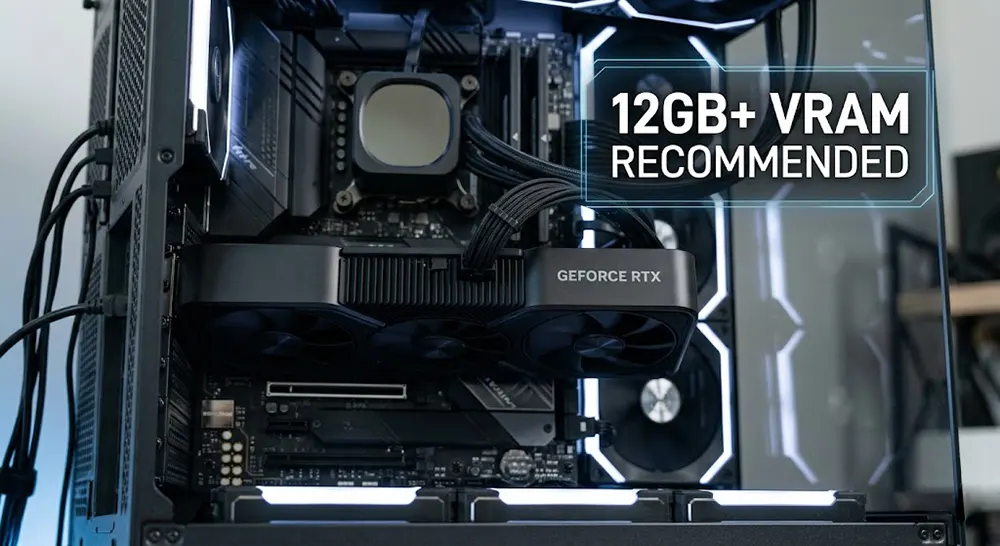
- GPU: For smooth inference with Llama 3 (2026 editions) or Mistral models, an NVIDIA RTX 3060 (12GB) is your baseline. However, to maintain 2026 standards for speed and multi-model switching, the RTX 4060 Ti (16GB) or RTX 50-series cards are the gold standard.
- RAM & CPU: You need at least 32GB of system RAM to ensure the OS doesn’t bottleneck the GPU. A modern multi-core processor (Intel i7/Ryzen 7 or better) is necessary to handle the background indexing for your local search engine.
The Software Stack: The Swiss Army Knife of Local AI
To achieve a functional Private LLM Setup, we utilize three core pillars:
- Oobabooga Text Generation WebUI: This is the industry-standard interface for running diverse model formats (GGUF, EXL2, AWQ).
- Docker: We use Docker to containerize our search engine, ensuring it stays isolated from the rest of your system files.
- SearXNG: A self-hosted, privacy-respecting metasearch engine that allows your LLM to “see” the live web without Google tracking the session.
Expert Tip: Avoid using consumer laptops with integrated graphics for this setup. The lack of dedicated VRAM will force the model onto the CPU, resulting in “one word per second” speeds that make the AI unusable for professional workflows.
Step 1: Installing the Core (Oobabooga Setup)
The heart of our Private LLM Setup is the Oobabooga Text Generation WebUI. Think of this as the operating system for your local models. It provides the necessary hooks for the API, the user interface, and the model loader that talks directly to your GPU.
The Installation Process: WSL2 and Linux
For OnlineShieldHub readers, I recommend WSL2 (Windows Subsystem for Linux) if you are on Windows, as it offers superior CUDA performance and better compatibility with Docker.
Bash
# Clone the repository
git clone https://github.com/oobabooga/text-generation-webui
cd text-generation-webui

# Run the automated installer
# Follow the prompts to select your GPU (NVIDIA)
./start_linux.sh
Choosing Your Model: Speed vs. Intelligence
In 2026, the performance of open-source models has reached a “Goldilocks” zone. For a balance of speed and reasoning, target Mistral-Nemo-12B or the Llama 3.1 8B variants.
- GGUF: Choose this if you want to offload some layers to system RAM.
- EXL2: Choose this for pure NVIDIA speed, specifically quantized to fit your exact VRAM limit (e.g., 4.0bpw for a 12GB card).
Launching the UI for Network Access
To ensure your Local AI is accessible via your secure home network (or WireGuard tunnel), launch with the following flags: python server.py --listen --api --n-gpu-layers 100
Expert Tip: Always enable the
--apiflag. This allows you to connect external tools or mobile apps to your home-grown “GPT” without needing to open the browser-based UI every time.
Step 2: Adding “Eyes” with Local Web Search (SearXNG)
A major weakness of standard LLMs is the “knowledge cutoff.” Usually, adding web search means using a Google or Bing API, which immediately tags your query with your IP and account data. To maintain Data Sovereignty, we utilize SearXNG.
The Privacy Layer: Metasearch Without the Footprint
SearXNG is a metasearch engine that acts as a middleman. It queries Google, Bing, and DuckDuckGo for you, aggregates the results, and hands them back to your LLM. The search giants only see the IP of your home server, not your individual identity or the context of your conversation.

Setup Guide: Running SearXNG via Docker
Docker is the cleanest way to run SearXNG without cluttering your host system. Create a docker-compose.yml file:
YAML
services:
  searxng:
    container_name: searxng
    image: searxng/searxng:latest
    ports:
      - "8080:8080"
    volumes:
      - ./searxng:/etc/searxng
    restart: always
Integrating with the LLM
Once the container is live at http://localhost:8080, navigate to the “Extensions” tab in Oobabooga. Enable the web_search plugin and point the URL to your local SearXNG instance. Now, when you ask, “What is the current price of Bitcoin?” your LLM performs a Local AI search, reads the snippets, and summarizes the live data—all while staying within your privacy perimeter.
Step 3: Local RAG (Retrieval-Augmented Generation)
The true power of a Private LLM Setup isn’t just chatting; it’s the ability to interact with your own proprietary data. Retrieval-Augmented Generation (RAG) allows you to feed your LLM thousands of pages of PDFs, internal codebases, or private research notes without ever uploading them to a third-party server.
Talking to Your Data: How It Works Locally
When you use Local RAG, your documents are not “read” by the LLM in the traditional sense. Instead, the system converts your text into mathematical “embeddings” (vectors). When you ask a question, the system finds the most relevant “chunks” of your documents and feeds them to the LLM as temporary context. This allows the model to provide hyper-accurate answers based on your data without needing to be retrained.
The Vector Database: The “Long-Term Memory”
To make this work at scale, Oobabooga and its associated extensions utilize a local vector database (such as ChromaDB or FAISS).
- The Process: You point the software to a folder on your hard drive.
- The Result: The LLM gains an “indexed memory” of everything in that folder.
- The Benefit: You can query technical manuals or legal contracts in seconds, ensuring your Data Sovereignty remains intact.
Security Check: The “Phone Home” Trap
Most beginner RAG tutorials suggest using OpenAI’s API for “embeddings.” This is a massive privacy leak. To maintain a Privacy-First AI, you must ensure your setup uses a local embedding model.
Expert Tip: In Oobabooga’s RAG settings, select a model like
sentence-transformers/all-MiniLM-L6-v2orBGE-Small-EN. These run entirely on your CPU/GPU and ensure that not even a “fingerprint” of your documents is sent to the cloud.
Hardening Your Setup: The “Air-Gap” Mindset
Setting up the software is only half the battle. To achieve true Data Sovereignty, you must treat your local AI server as a digital fortress. Even with local models, poorly configured software or automated “telemetry” updates can create silent data leaks. Hardening your system ensures that your Private LLM Setup remains an island, disconnected from the prying eyes of the web.
Firewall Rules: Creating the Digital Perimeter
The most effective way to guarantee “No Data Leaks” is to block your AI software from the internet at the OS level. If the LLM doesn’t have permission to talk to the outside world, it can’t leak your prompts—period.
- For Linux/WSL2 (UFW):Bash
# Deny all outgoing traffic by default for your AI user sudo ufw default deny outgoing # Allow only local network traffic (to access the UI from your phone/laptop) sudo ufw allow out to 192.168.1.0/24 - For Windows: Use “Windows Defender Firewall with Advanced Security” to create an Outbound Rule for
python.exe, setting the action to “Block the connection.”
Updating Safely: The “Snapshot” Protocol
In 2026, many open-source projects include “auto-update” features that might inadvertently reset your privacy configurations or download unvetted dependencies.
- Disable Auto-Updates: Always pull updates manually from GitHub so you can audit the changelog.
- Use Environment Snapshots: Before updating Oobabooga or your Docker containers, take a snapshot of your environment. This ensures that if a new version introduces a “phone home” feature, you can roll back instantly.
Encrypted Storage: Protecting the Physical Layer
Your Local RAG database and model logs are goldmines of personal information. If your hardware is physically stolen, an unencrypted drive gives the thief access to your entire “Local Brain.”
- Implementation: Store your
/models/,/logs/, and/embeddings/directories on a LUKS-encrypted partition (Linux) or a VeraCrypt hidden volume (Windows). - Result: Your data remains “Zero-Knowledge” even if the server is powered down.
Expert Tip: Think of your setup like a “Secure Room.” SearXNG is the only “window” to the outside world. If that window is shuttered by your firewall, your LLM becomes a pure, offline reasoning engine—the gold standard of privacy.
Conclusion: The Power of Local Sovereignty
Transitioning to a Private LLM Setup is more than just a technical project; it is a declaration of independence from the data-hungry ecosystems of Silicon Valley. While the initial configuration requires a “vọc vạch” (tinkering) spirit and a bit of trial and error with terminal commands, the payoff is unparalleled.
By the end of this journey, you aren’t just using an AI; you own it. You have a “Brain” that doesn’t track your history, doesn’t censor your ideas, and doesn’t charge a monthly subscription fee. In 2026, where data is the most valuable currency, the ultimate luxury is a system where the “Off” switch actually means your data stays with you. Remember: “The most powerful AI is the one only you have the keys to.”
FAQ (The Lab Manual)
1. Do I need a supercomputer to run a Private LLM?
Absolutely not. While having 24GB or 48GB of VRAM is ideal for the largest models, a consumer-grade PC with 8GB to 12GB of VRAM (like an RTX 3060 or 4060) is perfectly capable of running 8B to 12B parameter models. With modern quantization techniques like GGUF or EXL2, these models remain highly intelligent while fitting into standard hardware.
2. Is local AI as smart as GPT-4?
In 2026, the gap has narrowed significantly. Top-tier open-source models like the Llama 3.1 series or Mistral’s latest releases rival the original GPT-4 in logic, coding, and creative writing. When you combine these models with Local RAG using your own specific data, they often outperform generalized cloud models for specialized professional tasks.
3. How do I prevent the LLM from accessing my local files?
Privacy works both ways. To ensure the AI doesn’t scan files it shouldn’t, you should run the software in a Docker container or a dedicated “AI User” account on your OS. Only map the specific directories containing your research to the container. This “sandboxing” ensures the model only sees the data you explicitly provide.
4. Can I access my local LLM from my phone via VPN?
Yes, and this is the recommended way to use your AI on the go. Instead of exposing your server to the public internet, use a WireGuard or Mullvad VPN tunnel. Once connected to your home network via the VPN, you can access the Oobabooga web interface on your phone’s browser using your server’s local IP (e.g., http://192.168.1.50:7860).
Continue Reading
Step-by-Step: Building a Decentralized Personal Cloud Storage System
In today’s fast-paced world of data storage, setting up your own decentralized cloud has become a real powerhouse...
Read Insight →